ioDek · Dashboard · Every element
Everything you can put on your Tesla's dashboard
The ioDek dashboard runs full screen in the Tesla's browser and on your phone. Here is every card, data point, command and link you can place on it, with a real preview and what you need to get it.
- 7 Companion cards
- 16 widgets
- 164 data points
- 20 controls
- 30 ready-made links
- 8 display formats
Create an account · Dashboard guide · Try it in my Tesla: iodek.fr/bord
Companion
Cards that work with no car linked and no credits: time, weather, electricity price, parking, trips, fast chargers. Add links to your favourite sites and Home Assistant buttons.
Companion cards
No car or Tesla account needed, no credits used.
-
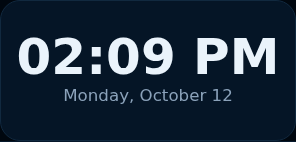
Time : Time and date in large type, readable at a glance from the seat.
-
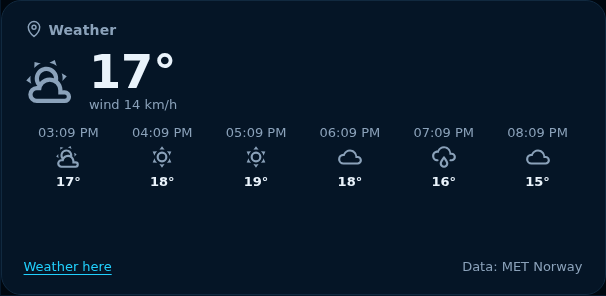
Weather : Current weather and the next six hours, at home or where the browser is (MET Norway).
-
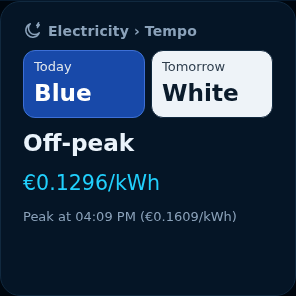
Electricity : The current electricity price, off-peak or peak hours, today's and tomorrow's Tempo colour, next change.
-
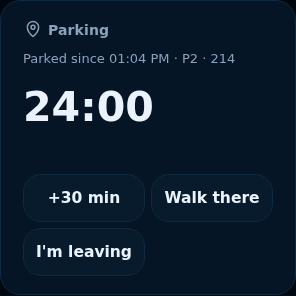
Parking : A parking marker with a timer: time left, +30 min and walking directions back to the car.
-
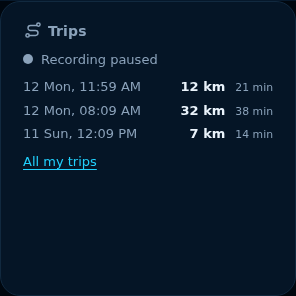
Trips : Trips recorded by the browser, to follow your journeys with no car linked.
-
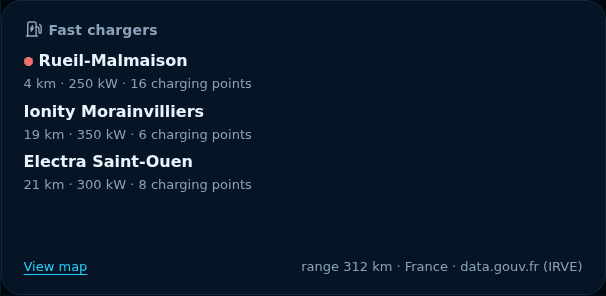
Fast chargers : The three nearest fast chargers within the remaining range, with their power and number of charging points.
-
Now playing : The title, artist, station and source the Tesla is playing, playing or paused.



Links
Ready-made sites, sorted by category, that open in the Tesla's browser.
- Movies and TV : Film, series and live TV platforms. (Netflix, Prime Video, Disney+, Canal+, YouTube, france.tv, Arte, TF1+, M6+, Molotov, Twitch, Plex, Pluto TV)
- Radio and music : Radio, music streaming and podcasts. (Spotify, Deezer, Radio France, TuneIn, Podcasts France Culture, YouTube Music)
- Road and charging : Route planning, charging, traffic and weather. (A Better Routeplanner, Chargemap, Superchargeurs Tesla, Bison Futé, Waze Live Map, Météo-France)
- News and sports : News, sport and trains. (franceinfo, L'Équipe, SNCF Connect)
- Games : Games to play while parked. (Lichess, Jeux en ligne (CrazyGames))
Home Assistant buttons
With the ioDek integration for Home Assistant: one tap opens the gate, turns on a light or runs a scene.
Car
The car's dashboard: battery, energy flow, current trip, charging, temperatures and battery health, plus every data point the Tesla sends, shown as a number, gauge, chart or light.
Widgets
Widgets that bring several of the car's data points together in one display.
-
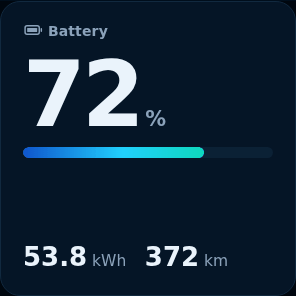
Battery : State of charge in large type, with energy left in kWh and range.
-
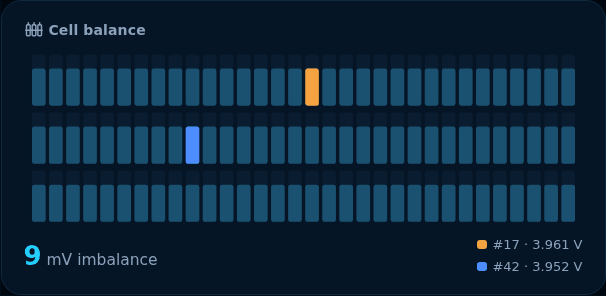
Pack diagram : The pack's cell groups as bars, highest and lowest marked, and the voltage gap between them.
-
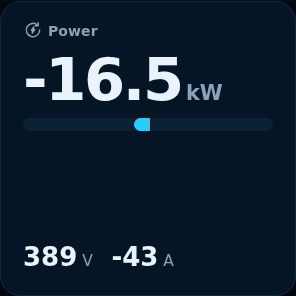
Power : Live pack power: used while driving, recovered when braking, received while charging, with voltage and current.
-
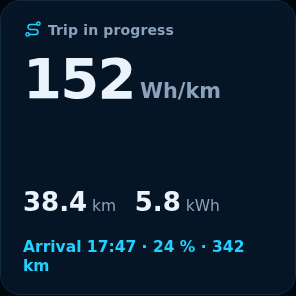
Current trip : Consumption, distance and energy of the current trip, and the expected arrival if a destination is set in the navigation.
-
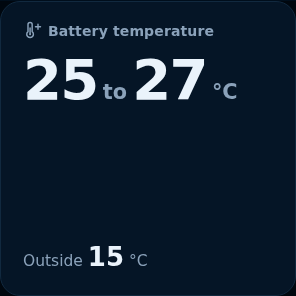
Battery temperature : Lowest and highest battery module temperatures, outside temperature and battery heating.
-
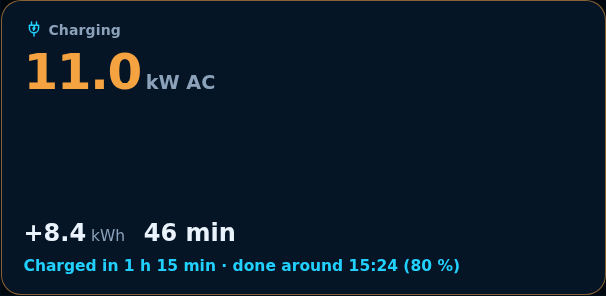
Current charge : The current charge: power, AC or DC, energy added, duration and expected end; when not charging, the state and limit.
-
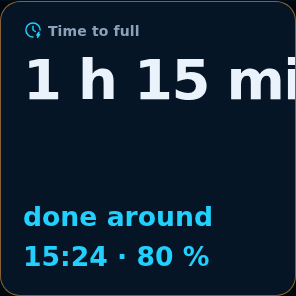
Time to full : Time left until the end of the charge and the time it will be done.
-
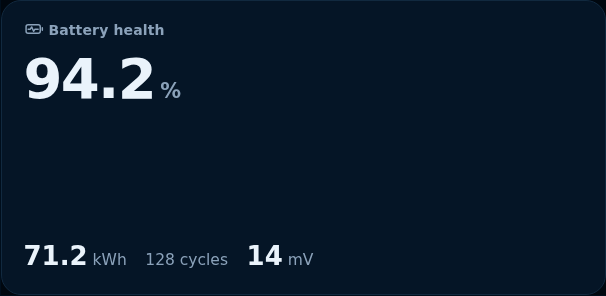
Battery health : Battery state of health (SOH) measured by ioDek, usable capacity, cycles and maximum cell gap.
-
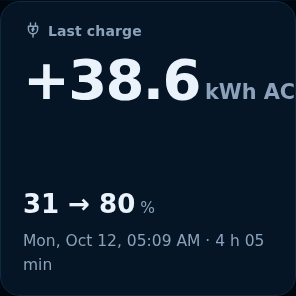
Last charge : The last completed charge: energy added, start and end levels, date and duration.
-
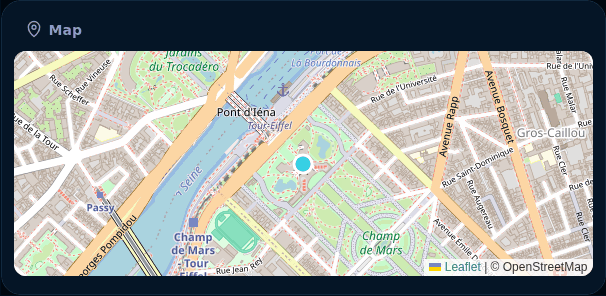
Map : The car's position on a map.
-
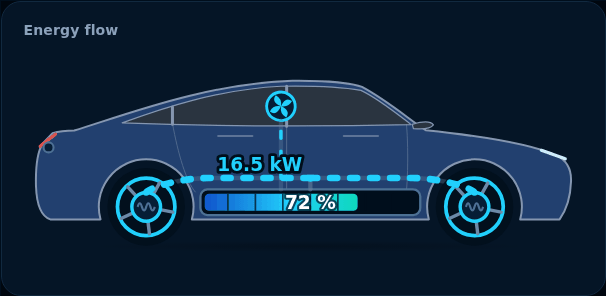
Energy flow : The car drawn in its real colour, with the energy flow animated: driving, regeneration, charging, climate.
-
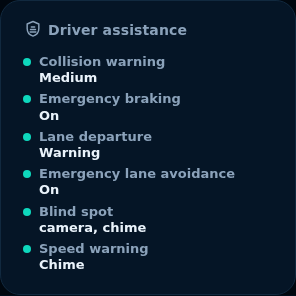
Driver assistance : The safety settings chosen in the car, read only: collision, emergency braking, lane, blind spot, speed.


Data display formats
Each data point can be shown in several ways: pick the format when adding it, change it later in the block settings.
- Number : The value alone, in large type, with its unit; coloured by thresholds if you set some.
- Gauge : A half circle that fills between a minimum and a maximum.
- Line chart : The chart of the last hour (or the last 15 minutes, 24 hours), with the minimum and maximum.
- Bar chart : Bars per hour or per day: average, minimum, maximum or sum.
- Bar : The value and a horizontal bar between two limits.
- Badge : A coloured badge for a state: charging, complete, closed…
- Text : The value as text, as the car sends it.
- Indicator light : A light on or off for a yes or a no.
Individual data points
Every data point the Tesla sends, to place on its own, sorted by theme as in “Add”.
Battery
State of charge, energy left, range, pack voltage and current, module temperatures.
- Battery level · Number (%) · Number, Gauge, Line chart, Bar chart, Bar
- True level (SoC) · Number (%) · Number, Gauge, Line chart, Bar chart, Bar
- Energy remaining · Number (kWh) · Number, Gauge, Line chart, Bar chart, Bar
- Full charge capacity (BMS) · Number (kWh) · Number, Gauge, Line chart, Bar chart, Bar
- Rated range · Number (km) · Number, Gauge, Line chart, Bar chart, Bar
- Estimated range · Number (km) · Number, Gauge, Line chart, Bar chart, Bar
- Pack voltage · Number (V) · Number, Gauge, Line chart, Bar chart, Bar
- Pack current · Number (A) · Number, Gauge, Line chart, Bar chart, Bar
- BMS state · State · Badge, Text
- Isolation resistance · Number · Number, Gauge, Line chart, Bar chart, Bar
- Battery heater · Yes or no · Indicator light, Text
- Min. module temperature · Number (°C) · Number, Gauge, Line chart, Bar chart, Bar
- Max. module temperature · Number (°C) · Number, Gauge, Line chart, Bar chart, Bar
- Coldest module · Number · Number, Gauge, Line chart, Bar chart, Bar
- Warmest module · Number · Number, Gauge, Line chart, Bar chart, Bar
Cells
Highest and lowest cell group voltages and their number: how well the pack is balanced.
- Min. cell voltage · Number (V) · Number, Gauge, Line chart, Bar chart, Bar
- Max. cell voltage · Number (V) · Number, Gauge, Line chart, Bar chart, Bar
- Lowest group · Number · Number, Gauge, Line chart, Bar chart, Bar
- Highest group · Number · Number, Gauge, Line chart, Bar chart, Bar
- Lowest group SoC · Number (%) · Number, Gauge, Line chart, Bar chart, Bar
Charging
Charging state, power, energy added, limit, current, cable and charger, scheduled charging.
- Charging state · State · Badge, Text
- Charge limit · Number (%) · Number, Gauge, Line chart, Bar chart, Bar
- Charge current · Number (A) · Number, Gauge, Line chart, Bar chart, Bar
- Time to charge limit (Tesla) · Number (h) · Number, Gauge, Line chart, Bar chart, Bar
- Time to full charge (Tesla) · Number (h) · Number, Gauge, Line chart, Bar chart, Bar
- Charger voltage · Number (V) · Number, Gauge, Line chart, Bar chart, Bar
- AC power · Number (kW) · Number, Gauge, Line chart, Bar chart, Bar
- DC power · Number (kW) · Number, Gauge, Line chart, Bar chart, Bar
- AC energy added (session) · Number (kWh) · Number, Gauge, Line chart, Bar chart, Bar
- DC energy added (session) · Number (kWh) · Number, Gauge, Line chart, Bar chart, Bar
- Fast charger detected · Yes or no · Indicator light, Text
- Charge port open · Yes or no · Indicator light, Text
- Scheduled charging · State · Badge, Text
- Scheduled charging start · Text · Text
- Scheduled departure · Text · Text
- Charge cable latch · State · Badge, Text
- Cable type · State · Badge, Text
- Fast charger type · State · Badge, Text
- Charger phases · Number · Number, Gauge, Line chart, Bar chart, Bar
- Full charge complete (BMS) · Yes or no · Indicator light, Text
- Current requested by the car · Number (A) · Number, Gauge, Line chart, Bar chart, Bar
- Maximum possible current · Number (A) · Number, Gauge, Line chart, Bar chart, Bar
- Charging requested · Yes or no · Indicator light, Text
- Charge port cold weather mode · Yes or no · Indicator light, Text
Driving
Odometer, gear and outside temperature.
- Odometer · Number (km) · Number, Gauge, Line chart, Bar chart, Bar
- Gear · State · Badge, Text
- Outside temperature · Number (°C) · Number, Gauge, Line chart, Bar chart, Bar
Drivetrain
Front and rear motors: torque, speed, state, voltage, current and temperatures; accelerator and brake pedals.
- Accelerator pedal · Number (%) · Number, Gauge, Line chart, Bar chart, Bar
- Brake pressure · Number · Number, Gauge, Line chart, Bar chart, Bar
- Rear motor torque (at the axle) · Number (Nm) · Number, Gauge, Line chart, Bar chart, Bar
- Front motor torque (at the axle) · Number (Nm) · Number, Gauge, Line chart, Bar chart, Bar
- Rear motor speed, at the axle (rpm) · Number · Number, Gauge, Line chart, Bar chart, Bar
- Front motor speed, at the axle (rpm) · Number · Number, Gauge, Line chart, Bar chart, Bar
- Rear motor state · State · Badge, Text
- Front motor state · State · Badge, Text
- Voltage at the rear motor · Number (V) · Number, Gauge, Line chart, Bar chart, Bar
- Voltage at the front motor · Number (V) · Number, Gauge, Line chart, Bar chart, Bar
- Rear motor current · Number (A) · Number, Gauge, Line chart, Bar chart, Bar
- Front motor current · Number (A) · Number, Gauge, Line chart, Bar chart, Bar
- Rear stator temperature · Number (°C) · Number, Gauge, Line chart, Bar chart, Bar
- Front stator temperature · Number (°C) · Number, Gauge, Line chart, Bar chart, Bar
- Rear inverter temperature · Number (°C) · Number, Gauge, Line chart, Bar chart, Bar
- Front inverter temperature · Number (°C) · Number, Gauge, Line chart, Bar chart, Bar
- Rear heatsink temperature · Number (°C) · Number, Gauge, Line chart, Bar chart, Bar
- Front heatsink temperature · Number (°C) · Number, Gauge, Line chart, Bar chart, Bar
- High-voltage interlock · State · Badge, Text
Dynamics
Longitudinal and lateral acceleration, road gradient.
- Longitudinal acceleration · Number (m/s²) · Number, Gauge, Line chart, Bar chart, Bar
- Lateral acceleration · Number (m/s²) · Number, Gauge, Line chart, Bar chart, Bar
- Road gradient · Number (%) · Number, Gauge, Line chart, Bar chart, Bar
Driver assistance
Self-driving distance, cruise control, speed, collision and lane departure warnings.
- Distance on FSD · Number (km) · Number, Gauge, Line chart, Bar chart, Bar
- Distance since reset · Number (km) · Number, Gauge, Line chart, Bar chart, Bar
- Cruise control speed · Number · Number, Gauge, Line chart, Bar chart, Bar
- Following distance · State · Badge, Text
- Speed limit mode · Yes or no · Indicator light, Text
- Speed limit warning · State · Badge, Text
- Lane departure avoidance · State · Badge, Text
- Emergency lane departure avoidance · Yes or no · Indicator light, Text
- Forward collision warning · State · Badge, Text
- Automatic emergency braking off · Yes or no · Indicator light, Text
- Automatic blind spot camera · Yes or no · Indicator light, Text
- Blind spot warning chime · Yes or no · Indicator light, Text
Cabin
Locks, doors, windows, Sentry, climate, set temperatures, heated seats and steering wheel.
- Locked · Yes or no · Indicator light, Text
- Doors, frunk and trunk · Text · Text
- Driver window · State · Badge, Text
- Passenger window · State · Badge, Text
- Rear left window · State · Badge, Text
- Rear right window · State · Badge, Text
- Sentry Mode · State · Badge, Text
- Valet Mode · Yes or no · Indicator light, Text
- Inside temperature · Number (°C) · Number, Gauge, Line chart, Bar chart, Bar
- Climate · State · Badge, Text
- A/C · Yes or no · Indicator light, Text
- Auto mode · State · Badge, Text
- Driver set temperature · Number (°C) · Number, Gauge, Line chart, Bar chart, Bar
- Passenger set temperature · Number (°C) · Number, Gauge, Line chart, Bar chart, Bar
- Steering wheel heater · Number · Number, Gauge, Line chart, Bar chart, Bar
- Driver seat · Number · Number, Gauge, Line chart, Bar chart, Bar
- Passenger seat · Number · Number, Gauge, Line chart, Bar chart, Bar
- Rear left seat · Number · Number, Gauge, Line chart, Bar chart, Bar
- Rear center seat · Number · Number, Gauge, Line chart, Bar chart, Bar
- Rear right seat · Number · Number, Gauge, Line chart, Bar chart, Bar
- Defrost · State · Badge, Text
- Cabin Overheat Protection · State · Badge, Text
- Preconditioning · Yes or no · Indicator light, Text
Tires
Pressure of each tyre and pressure warning.
- Front left pressure · Number (bar) · Number, Gauge, Line chart, Bar chart, Bar
- Front right pressure · Number (bar) · Number, Gauge, Line chart, Bar chart, Bar
- Rear left pressure · Number (bar) · Number, Gauge, Line chart, Bar chart, Bar
- Rear right pressure · Number (bar) · Number, Gauge, Line chart, Bar chart, Bar
- Pressure warning · Yes or no · Indicator light, Text
Location
Location, navigation destination, distance and time left, battery on arrival, known places.
- Location · Text · Text
- Trip start · Text · Text
- Destination (coordinates) · Text · Text
- Destination · Text · Text
- Distance to arrival · Number (km) · Number, Gauge, Line chart, Bar chart, Bar
- Time to arrival · Number (min) · Number, Gauge, Line chart, Bar chart, Bar
- Battery expected at arrival · Number (%) · Number, Gauge, Line chart, Bar chart, Bar
- Traffic delay · Number (min) · Number, Gauge, Line chart, Bar chart, Bar
- Heading · Number (°) · Number, Gauge, Line chart, Bar chart, Bar
- At home (according to the car) · Yes or no · Indicator light, Text
- At work (according to the car) · Yes or no · Indicator light, Text
- At a favorite place · Yes or no · Indicator light, Text
- HomeLink nearby · Yes or no · Indicator light, Text
- HomeLink devices · Number · Number, Gauge, Line chart, Bar chart, Bar
Lifetime energy
Energy charged, used and recovered since the car left the factory.
- Energy charged (total) · Number (kWh) · Number, Gauge, Line chart, Bar chart, Bar
- Energy used (total) · Number (kWh) · Number, Gauge, Line chart, Bar chart, Bar
- Energy recovered by regen · Number (kWh) · Number, Gauge, Line chart, Bar chart, Bar
Security
Paired keys, lights, occupants and seat belts, guest mode, PIN to drive, remote start.
- Paired keys (phones and cards) · Number · Number, Gauge, Line chart, Bar chart, Bar
- Hazard lights · Yes or no · Indicator light, Text
- High beams · Yes or no · Indicator light, Text
- Turn signals · State · Badge, Text
- Climate keeper · State · Badge, Text
- Not enough power to heat · Yes or no · Indicator light, Text
- Driver seat occupied · Yes or no · Indicator light, Text
- Driver seat belt · State · Badge, Text
- Passenger seat belt · State · Badge, Text
- Guest mode · Yes or no · Indicator light, Text
- Guest phone access · State · Badge, Text
- Service Mode · Yes or no · Indicator light, Text
- PIN to Drive · Yes or no · Indicator light, Text
- Remote start allowed · Yes or no · Indicator light, Text
- Remote start active · Yes or no · Indicator light, Text
Software
Installed version, available update, download and installation.
- Software version · Text · Text
- Update available · Yes or no · Indicator light, Text
- Offered version · Text · Text
- Update in progress · Yes or no · Indicator light, Text
- Update download · Number (%) · Number, Gauge, Line chart, Bar chart, Bar
- Update installation · Number (%) · Number, Gauge, Line chart, Bar chart, Bar
- Expected installation time · Number (min) · Number, Gauge, Line chart, Bar chart, Bar
- Scheduled installation · Text · Text
Configuration
Model, trim, colours, wheels, car name and units set on the screen.
- Model · State · Badge, Text
- Trim · Text · Text
- Paint · Text · Text
- Roof · Text · Text
- Wheels · Text · Text
- Car name · Text · Text
- Efficiency package · Text · Text
- European vehicle · Yes or no · Indicator light, Text
- Right-hand drive · Yes or no · Indicator light, Text
- Sunroof · State · Badge, Text
- Distance unit · State · Badge, Text
- Temperature unit · State · Badge, Text
- Tire pressure unit · State · Badge, Text
- 24-hour clock · Yes or no · Indicator light, Text
- Charge display · State · Badge, Text
Copilot
A live map and the current trip next to the Tesla's navigation: arrival time, expected battery, traffic, weather at destination, fast chargers along the way.
Widgets
Widgets that bring several of the car's data points together in one display.
-
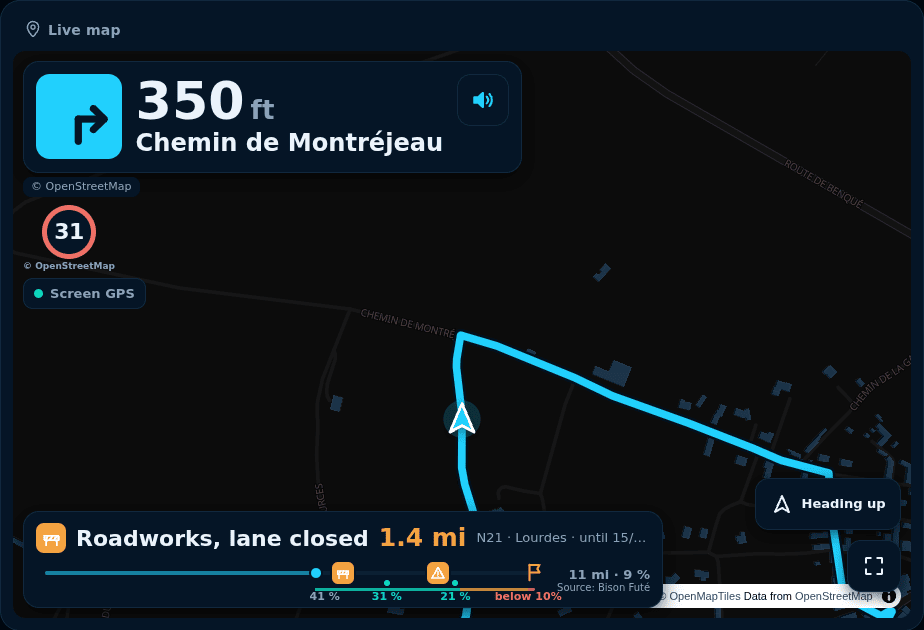
Live map : The live map that follows the car: navigation route, speed limit, road alerts and the next turn.
-
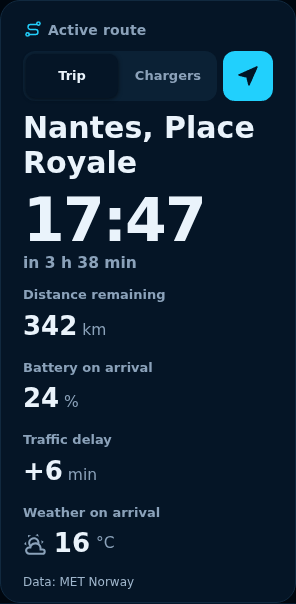
Active route : Destination, arrival time, distance left, expected battery on arrival, traffic delay and weather at destination, with alerts.


Drivetrain
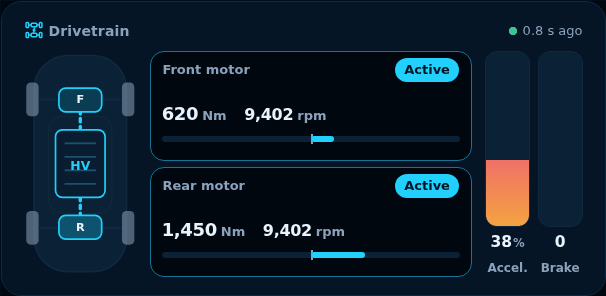
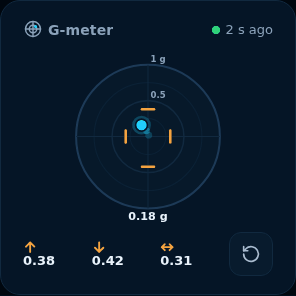
The car seen from above, as in Service mode: motors, torque, speed, pedals, and accelerations in the G-meter. Data sent with the Detailed profile or during a Pedal Boost.
Widgets
Widgets that bring several of the car's data points together in one display.
-
Drivetrain : Each motor seen from above, as in Service mode: torque, speed, state, voltage, current, temperatures, and the pedals.
-
G-meter : The car's accelerations in a circle: acceleration, braking, cornering, and the session's peaks.


Controls
Charging, climate, heated seats and steering wheel, locks, Sentry, trunks, windows, charge port, horn: as a switch, button, slider or + / −, with a confirmation for sensitive commands.
Controls
Each command needs the matching option in the car settings and the ioDek virtual key.
- Charging : Start or stop charging, with the live charging state.
- Charge limit : Set the charge limit, from 50 to 100%.
- Charge current : Set the charging current, from 1 to 32 A.
- Climate : Turn the climate on or off, with its state.
- Temperature : Set the cabin temperature.
- Max defrost : Start or stop max defrost.
- Steering wheel heater : Turn the heated steering wheel on or off.
- Seat heater : Set a seat heater, from off to level 3; one block per seat.
- Cabin Overheat Protection : Choose cabin overheat protection: off, fan only or air conditioning.
- Lock : Lock or unlock the car, with the lock state.
- Unlock : Unlock the car, after confirmation.
- Sentry Mode : Turn Sentry mode on or off.
- Frunk : Open the front trunk, after confirmation.
- Trunk : Open or close the rear trunk, after confirmation.
- Vent windows : Vent all four windows, after confirmation.
- Close windows : Close all four windows.
- Open charge port : Open the charge port, after confirmation.
- Close charge port : Close the charge port.
- Honk horn : Sound the horn to find the car.
- Flash lights : Flash the headlights.